GCI FINANCIAL - Global Leaders in Online Trading
DEMO LOGIN  |   LIVE LOGIN

Deutsch  |  Français  |  Español  |  Русский  |  中文  |  عربي  |  日本語

  • About GCI
    • Company Profile
    • In the Press
    • Recommended Broker
    • Customer Funds
    • The GCI Advantage
    • Contact GCI
    • Home Page
  • CFD/Share Trading
    • Free Demo Account
    • Overview of CFDs
    • Software Preview
    • Margin Requirements
    • Spreads
    • Cost of Carry
    • Contract Specifications
    • User Manual
    • Open a Live Account
    • CFD FAQ
  • Forex Trading
    • Account Types
    •  - Standard Forex
    •  - Mini Forex
    •  - Institutional Forex
    • Software Preview
    • Spreads
    • Margin Requirements
    • Cost of Carry
    • Available Currencies
    • User Manual
    • Free Practice Account
  • Open an Account
    • Open a Live Account
    • Account Forms
    • Depositing Funds
    • Withdrawing Funds
    • Online Statements
    • Technical Support
    • Chat / Phone Trading
    • FAQ
  • Services
    • Money Managers
    • Introducing Brokers
    • Managed Accounts
    • Gold/Silver Trading
    • Spot Forex
    • Futures and Shares
    • Free Demo Account
    • Chat Forum
    • Technical Support
  • Resources
    • GCI News/Commentary
    • Forex Charts Netdania
    • Forex Charts FXTrek
    • Share CFD Charts
    • Forex Trading Signals
    • Forex Quotes Netdania
    • Forex Quotes FXTrek
    • Share & Index Quotes
    • Forex News Headlines
    • Stock Market News
    • Forex Chat Forum
    • Training & Background
    • Links

Get to know GCI

  • GCI Overview
  • Software Preview
  • GCI in the Press
  • Introducing Brokers
  • The GCI Advantage
  • Recommended Broker
  • Client Funds

Account Opening and Login

  • Open a live Account
  • Free Demo Account
  • Login: Demo Trading
  • Login: Live Trading

Demo Trading

Trading Software Download

GCI's windows-based trading software provides the same functionality as the Java-based software.  It can be used to access the same account that you login to from our website.  This software is offered as an additional alternative for clients who prefer it.

Click here to Download Trading Software... 

Installation Instructions:
1)  Click on the above link to download the ICTS trading software.  Click "Run" or "Open" to begin installation


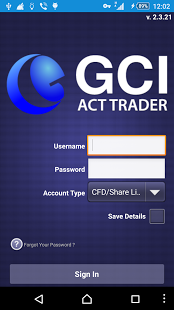
2)  Then type in your User Name and Password (if you do not already have User Name and Password, Click here to request a demo account).  The "Account Type" field is where you specify the account type you are logging into:

For example, logging into a Mini Forex Demo account would look like this:


3)  Click "OK" and you will be logged in and ready to start trading within 20 seconds.

Please contact techsupport@gcitrading.com at any time for assistance


Leaders in Forex Trading

  • Trade over 20 currencies, Gold, and S&P 500 - all with zero commissions and 0.5% margin requirement...

Trade Shares on 2% Margin

  • Trade North American, European, and Asia/Pacific shares and indices online, commission free...

© 2006 GCI Financial Ltd. All rights reserved. | Home page | Open an Account | Contact GCI | Risk Disclaimer | Site Map