The three numbers that matter
Every margin discussion comes back to these three figures. Learn them first, then watch them move as we open trades below.
Equity
The current total value of your account, including unrealised profit or loss on open positions.
Used Margin (UsdMr)
The portion of your equity that's reserved as collateral for your currently open positions.
Usable Margin (UsblMr)
What's left to open new trades. Always equal to Equity − Used Margin.
Open the account
Assume you have opened a Live ActTrader account, and deposited $10,000.
When you first login, you will see the 10,000 in the Equity column of your Account Information window. You will also see that the UsdMr ('Used Margin') is 0.00, and that the UsblMr ('Usable Margin' or 'Available Margin') is 10,000, as pictured below:
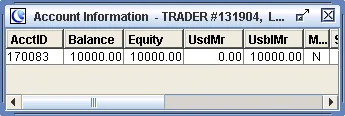
The relationship between Equity and Margin
Your Usable Margin will always be equal to Equity less Used Margin. Therefore it is the Equity, not the Balance, that is used to determine Usable Margin and will determine if and when a Margin Call is reached.
As long as your Equity is greater than your Used Margin, you will not have a Margin Call. As soon as your Equity falls below your Used Margin, you will receive a margin call.
Buy 20 lots of USD/JPY
Now assume that you buy 20 lots of USD/JPY. Your Equity remains $10,000. Used Margin is now $1,000, because the margin requirement in an ICTS Forex account is $50 per lot. Usable Margin is now $9,000 (Equity less Used Margin, as pictured below):
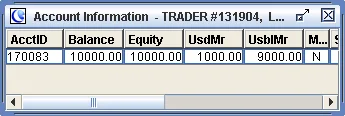
If you were to close out the 20 lots of USD/JPY (by selling it back) at the same price at which you bought it, your Used Margin would go back to 0.00 and your Usable Margin would go back to $10,000. Your Equity would remain unchanged at 10,000.
Try this yourself, risk-free
A free demo account gives you the same $10,000 starting balance, same ActTrader platform, same margin behaviour — with virtual funds.
Add to the position — 30 lots total
But instead of closing the 20 lots, assume instead that you purchased 10 more lots of USD/JPY, for a total of 30 lots of USD/JPY. You will now have the same Equity, but your Used Margin will be $1,500 (30 lots at $50 margin per lot). And your Usable Margin will now be only $8,500.
What triggers a Margin Call
With this position on, you will make a large profit if USD/JPY rises. We will illustrate a Margin Call that occurs when USD/JPY falls. Assume that USD/JPY starts to fall. You are long 30 lots, so you will see your Equity fall along with it. Your Used Margin will remain at $1,500.
Margin Call Triggered
Once your Equity drops below $1,500, you will have a Margin Call. This means that some or all of your 30-lot position will immediately be closed at current market prices.
The closed position will show up in your Reports or History with
the MC
code next to it.
The takeaway: leverage amplifies both directions. The bigger the position, the smaller the price move needed to drag your Equity into margin-call territory.
What to remember
-
Usable Margin = Equity − Used Margin. This formula is the entire game. Memorise it.
-
Equity, not Balance, is what counts. Open-position P&L moves Equity in real time. Balance only updates when you close positions.
-
In an ICTS Forex account, margin is $50 per lot. Other GCI platforms and instruments have their own margin requirements — see Spreads & Margins for the full list.
-
When Equity falls below Used Margin → Margin Call. Positions get auto-closed and tagged
MCin your history.
Jump to a step
Practice without risk
Open a free demo with virtual funds and try the example above yourself.
Open a Free Demo or open a live account →